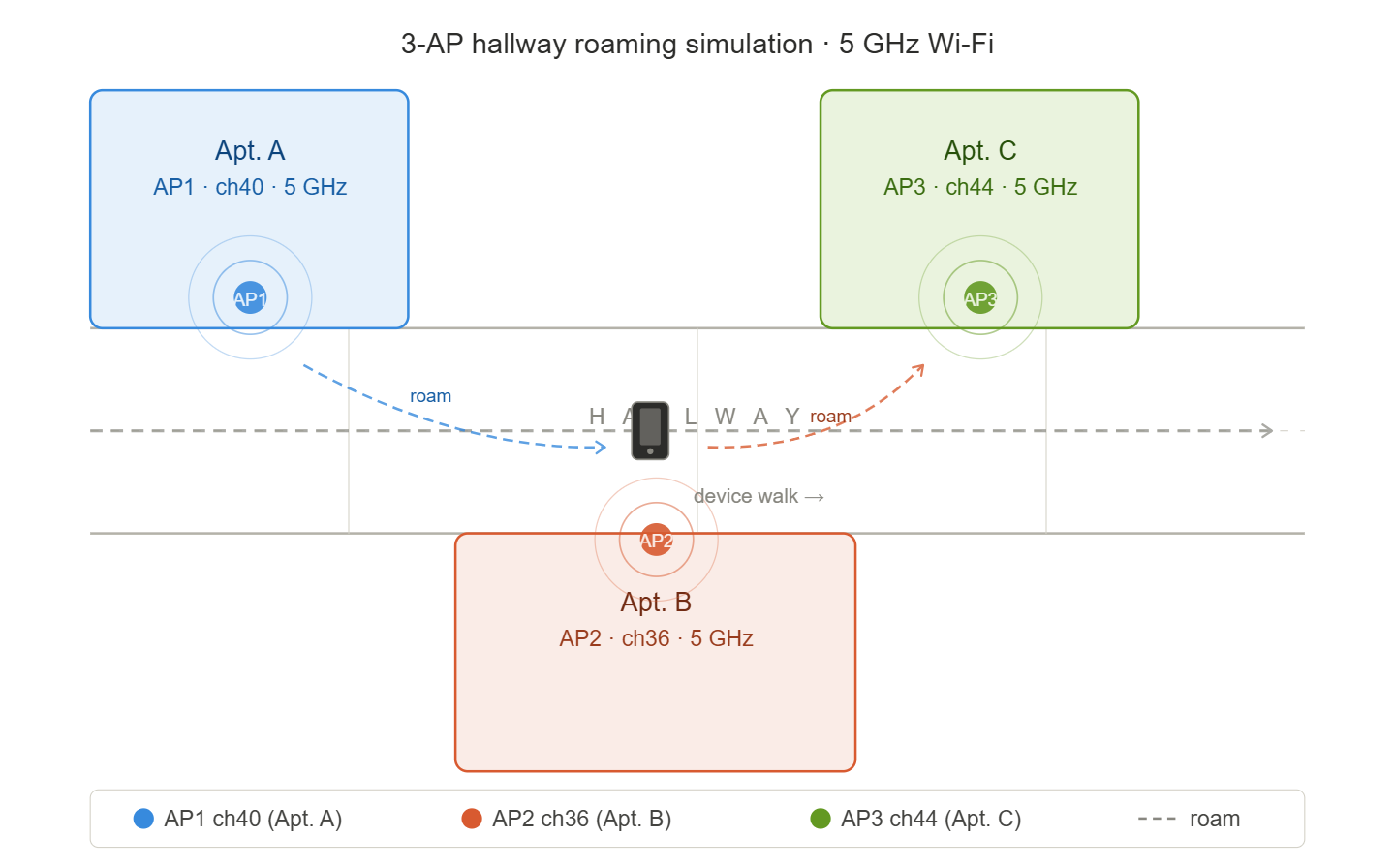
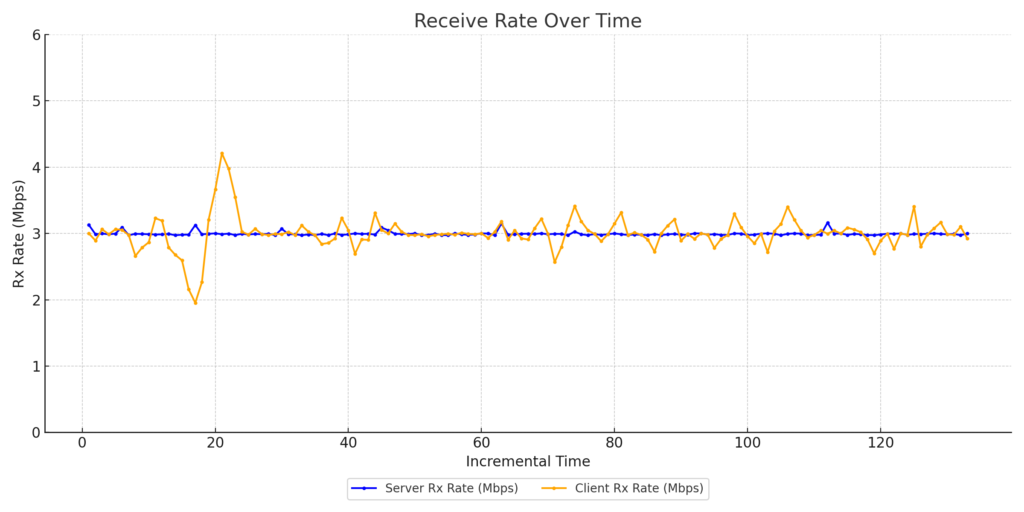
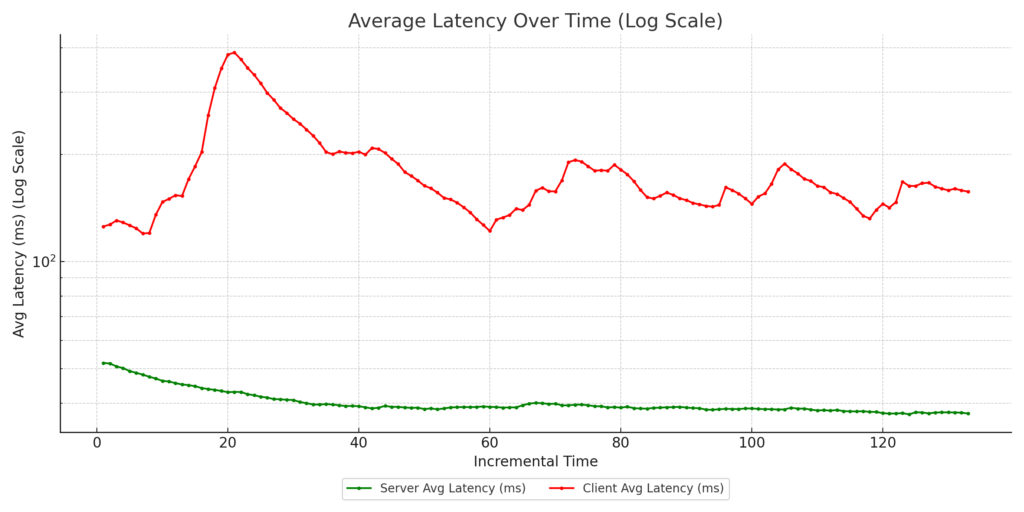
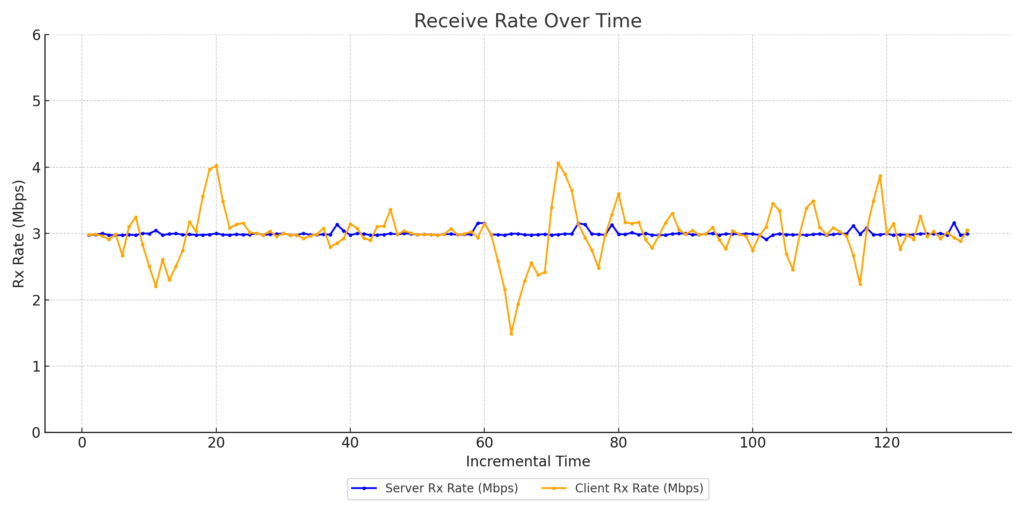
This is what “you design the network, clients decide how it works” looks like in practice. Inside an RF chamber, three virtual APs were spun up on a Candela LANforge — identical configs, identical settings, only the RF channel changed. A Pixel 7 Pro and an iPhone SE 2nd Gen walked the same simulated hallway through the same RF conditions and made completely different roaming decisions. Then we added traffic and both devices changed their behavior again. A controlled environment removes every excuse — same gear, same config, different clients, wildly different outcomes. That’s exactly why client benchmarking matters.
WiFi Roaming – 3-AP Hallway Simulation
📡 WiFi Roaming Simulation – 3-AP Hallway
iPhone SE 2nd Gen & Google Pixel 7 Pro · 5 GHz Band · Attenuator-Simulated Walk
Speed:4×t = 0s
AP1 ch40 (left) AP2 ch36 (right) AP3 ch44 (left) Google Pixel 7 Pro iPhone SE 2nd Attenuator pattern
RSSI vs time with attenuation overlay & roaming event markers. Left axis: RSSI (dBm). Right axis: Attenuation (dB, inverted). Purple dashed lines = roaming events.
WiFi Roaming – 3-AP Hallway Simulation
📡 WiFi Roaming Simulation – 3-AP Hallway
iPhone SE 2nd Gen & Google Pixel 7 Pro · 5 GHz Band · Attenuator-Simulated Walk
Speed:4×t = 0s
AP1 ch40 (left) AP2 ch36 (right) AP3 ch44 (left) Google Pixel 7 Pro iPhone SE 2nd Attenuator pattern
RSSI vs time with attenuation overlay & roaming event markers. Left axis: RSSI (dBm). Right axis: Attenuation (dB, inverted). Purple dashed lines = roaming events.
Introduction: The Quest for Uninterrupted Connectivity
At 802.11 Networks Corp, we’re driven by a passion for Enterprise Wireless. We believe in demystifying complex topics, diving deep into the technical intricacies, and presenting our findings in a way that sparks conversation and propels industry-wide improvements. Today, we’re focusing on a critical aspect of modern living: Wi-Fi roaming in Multi-Dwelling Units (MDUs).
Think bustling apartment complexes, vibrant student housing, comfortable senior living facilities, and modern condominiums. Why this focus?
Ubiquity of MDU Living: A significant portion of the population resides in MDUs. In the US, estimates range from 30% to 42%, highlighting the sheer scale of this living arrangement.
The Promise of Managed Wi-Fi: MDUs offer a unique opportunity for property-wide, managed Wi-Fi solutions. When implemented effectively, these systems deliver substantial technical and economic advantages to residents.
A cornerstone of a successful managed Wi-Fi deployment is seamless roaming. Residents expect their connected devices to transition smoothly between access points (APs) as they move throughout the property. This eliminates frustrating disconnections and ensures a consistent user experience.
In this post, we’ll dissect common MDU deployment architectures, exploring their strengths and weaknesses. We’ll start by differentiating between managed and non-managed environments, then delve into four specific client authentication and roaming scenarios. Our goal is not to declare a “winner” but to foster a constructive dialogue that enhances human connectivity.
Understanding MDU Wi-Fi Architectures
To fully understand the results of the performance test, we must first understand the architectures that are being tested.
1. Traditional Residential Deployments: The “Home Router” Approach
Each apartment operates its own dedicated home router.
These networks typically feature:
A private SSID secured with WPA2-Personal for individual residents.
A universal SSID, often utilizing Passpoint with pre-installed profiles, enabling limited roaming across the complex.
Technical Characteristics:
NAT (Network Address Translation) is standard, isolating each apartment’s network.
802.11r (Fast Transition) is generally absent.
Some APs may implement key caching to expedite re-authentication for returning devices.
Limitations:
Limited roaming performance.
Interference between many routers.
Difficult to manage as a whole.
2. Managed MDU Deployments: Centralized Control
A professionally designed RF network covers the entire property.
APs are strategically placed based on a thorough RF survey, ensuring optimal coverage.
A single, unified SSID is broadcast throughout the property.
Technical Characteristics:
VLANs (Virtual Local Area Networks) are employed to segregate resident traffic, ensuring privacy and security.
Authentication options include:
Passpoint-like systems with pre-installed profiles (ideal for smartphones and laptops).
Multi-PSK (MPSK) solutions with RADIUS authentication (offering a balance of security and ease of use, and better IoT compatibility).
Key Points:
Allows 802.11r to be implemented
Centralized management and troubleshooting.
Enhanced security and privacy relative to using a single, shared PSK.
Ability to fine tune the network.
Quantifying Roaming Performance: The Test Bed
To objectively assess roaming performance, we constructed a test bed that replicated the scenarios described above. We distilled the myriad of possible configurations into four representative cases:
WPA2-Enterprise (TLS) + Bridged + 802.11r:
Represents a managed MDU with Passpoint or similar pre-installed profiles.
Bridged network: Clients retain their IP address during roaming.
802.11r: Rapid authentication using R1 keys distributed via the Distribution System (DS).
WPA2-Enterprise (TLS) + NAT’d + Key-Caching:
Mirrors the universal roaming SSID in traditional residential deployments (e.g., Xfinity Mobile Hotspot).
NAT’d network: DHCP lease renewal and Layer 3 (L3) connection break during roaming.
Key caching: Speeds up re-authentication for returning clients, but no 802.11r.
MPSK-RADIUS + Bridged + 802.11r (or Key-Caching):
Represents a managed MDU with MPSK and RADIUS authentication.
Bridged network: Maintains L3 connection.
802.11r availability based on capabilities of backend MPSK solution used
Each resident gets a unique PSK tied to a VLAN.
MPSK-RADIUS + NAT’d + Key-Caching:
While less common, it was tested to provide a complete view.
NAT’d network.
Key Caching.
The Test Setup: Precision and Control
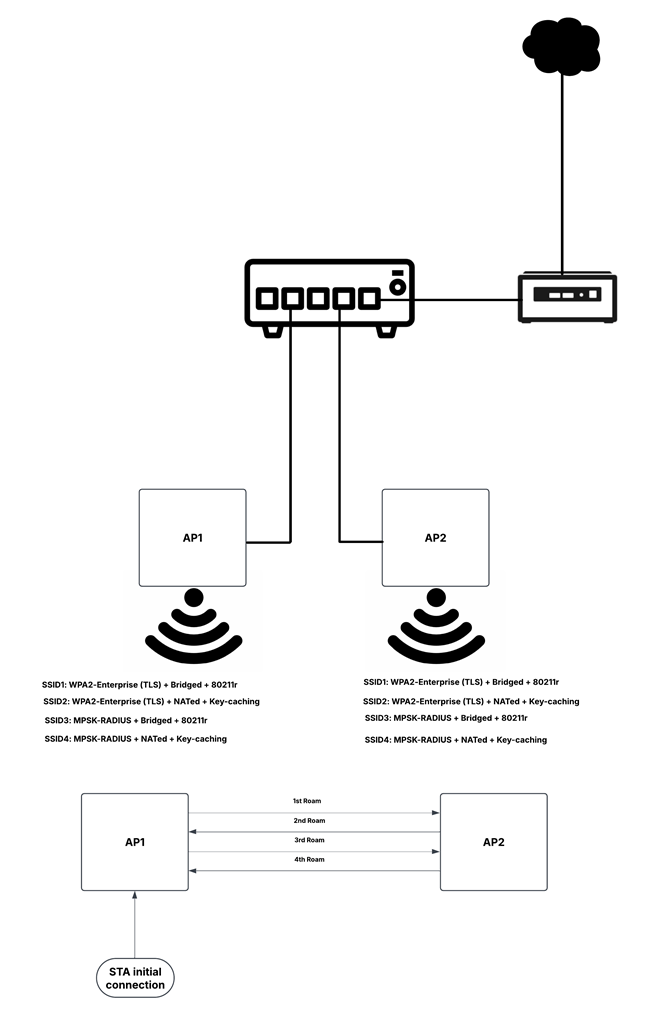
Two Enterprise OpenWiFi APs broadcasted the four SSIDs, each corresponding to a test case.
The APs were connected to a Linux-based router (providing DHCP, RADIUS, and NAT) via a switch.
FreeRADIUS was used for RADIUS authentication.
All tests were conducted in RF isolation chambers to ensure accuracy.
Roaming events were manually triggered for consistent results.
Test Architecture Diagram:
Test Execution: Measuring Roaming Dynamics
Each test began with a pre-authenticated client connected to AP1.
A continuous ping to 8.8.8.8 (Google DNS) was executed with a 1-second interval.
Four manual roaming events were triggered during the 100-ping test.
Latency and packet loss were recorded for each scenario.
Results: A Clear Picture of Performance
WPA2-Enterprise (TLS) + Bridged + 802.11r:
Packet Loss: 4%
Average Latency: 16.98 ms
WPA2-Enterprise (TLS) + NAT’d + Key-Caching:
Packet Loss: 12%
Average Latency: 19.91 ms
MPSK-RADIUS + Bridged + 802.11r:
Packet Loss: 1%
Average Latency: 18.20 ms
MPSK-RADIUS + NAT’d + Key-Caching:
Packet Loss: 9%
Average Latency: 18.07 ms
Analysis and Conclusion: Optimizing MDU Wi-Fi
Why Roaming Matters: Seamless roaming is essential for a positive user experience in MDUs. Disruptions lead to frustration and decreased productivity.
Best Solutions:
Managed MDUs:
Regardless of the authentication method (MPSK/WPA2-Enterprise), Bridged networks with 802.11r offer excellent performance.
MPSK-RADIUS with VLANs adds user-friendlinesss for IoT devices
Traditional Residential:
NAT’d networks with key caching are common, but less ideal.
Requires separate, universal SSID for Roaming across property.
Client Considerations:
Passpoint benefits devices with pre-installed profiles.
MPSK-RADIUS accommodates IoT and other devices with limited capabilities.
Comparison Matrix:
Feature
WPA2-Enterprise (TLS) + Bridged + 802.11r
WPA2-Enterprise (TLS) + NAT’d + Key-Caching
MPSK-RADIUS + Bridged + 802.11r
MPSK-RADIUS + NAT’d + Key-Caching
Network Mode
Bridged
NAT’d
Bridged
NAT’d
Roaming Support
802.11r
Key-Caching
802.11r (partial)
Key-Caching
Authentication
Passpoint (pre-installed profiles)
Passpoint (pre-installed profiles)
MPSK
MPSK
Traffic Segmentation
VLANs
Per-user NAT
VLANs
Per-user NAT
Packet Loss
4%
12%
1%
9%
Average Latency (ms)
16.98
19.91
18.20
18.07
Best Use Case
Managed MDU, devices with Passpoint profiles
Traditional Residential Model (Separate NAT’d Home Router per unit)
Managed MDU, diverse client device types
Less Common deployment use cases. TBD.
Pros
Lowest latency, seamless roaming
Simpler NAT isolation
Very low packet loss, diverse client ecosystem
TBD
Cons
Passpoint reliance can limit IoT device support
Higher packet loss, DHCP renewals
Partial 802.11r support
Higher packet loss compared to Bridged 802.11r
Key Takeaway: By understanding these technical nuances, Professional WLAN experts, like 802.11 Networks Corp, can help ISPs & MDU Network Operators to deliver exceptional roaming experiences.
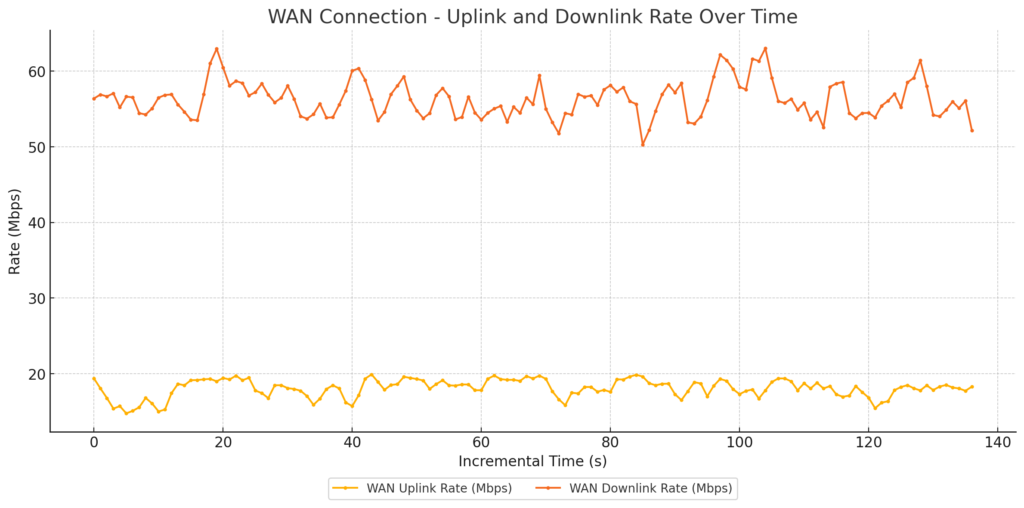
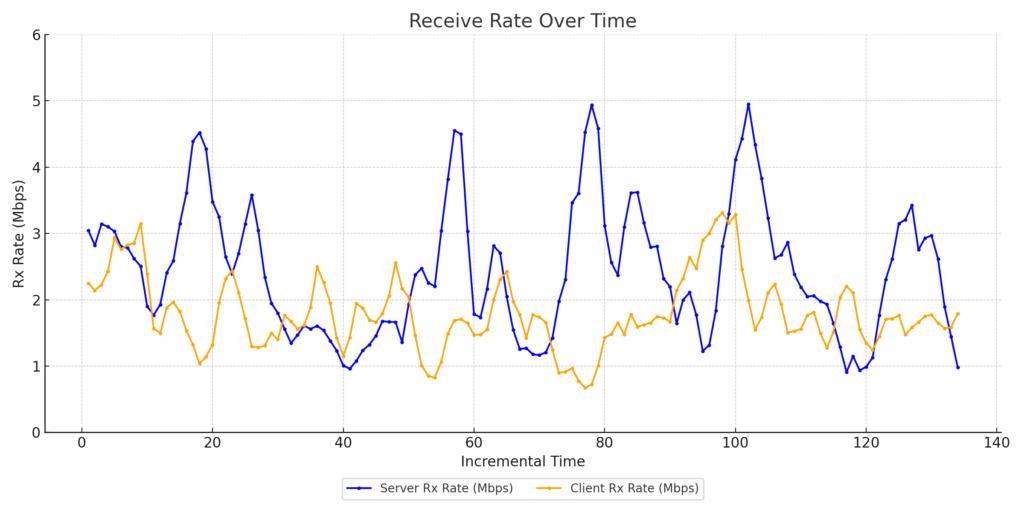
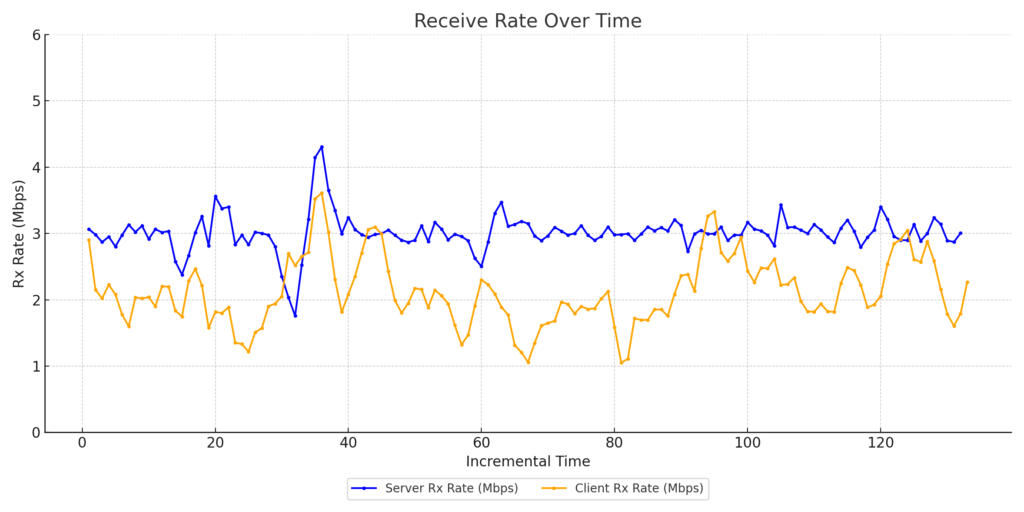
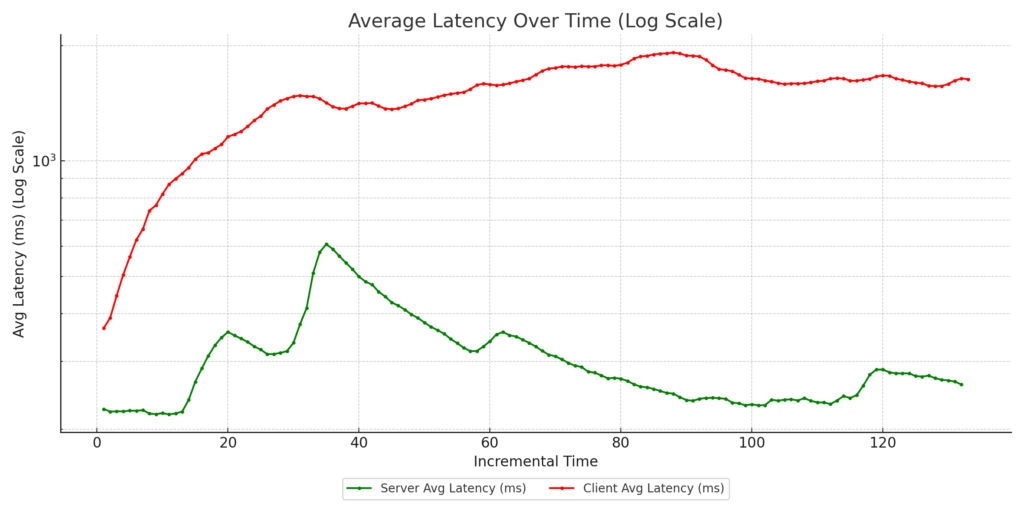
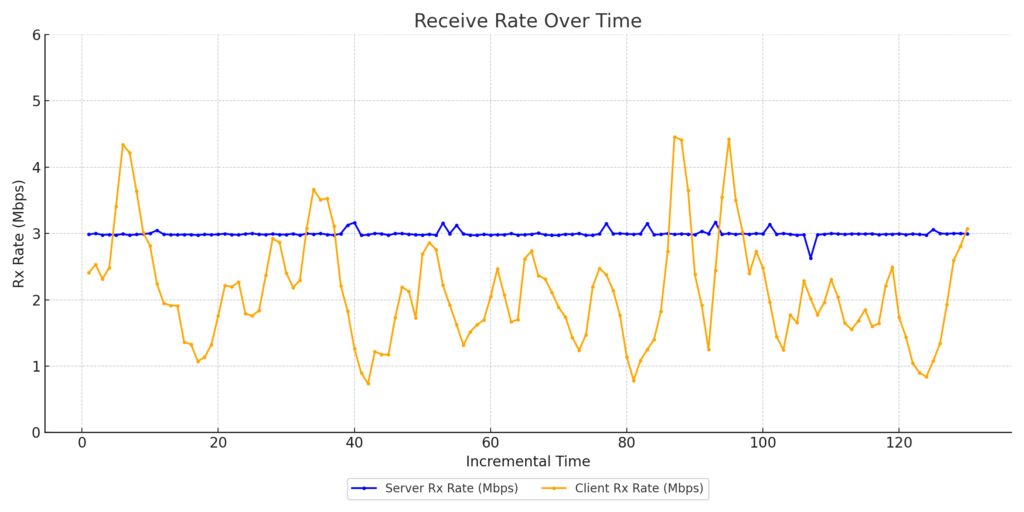
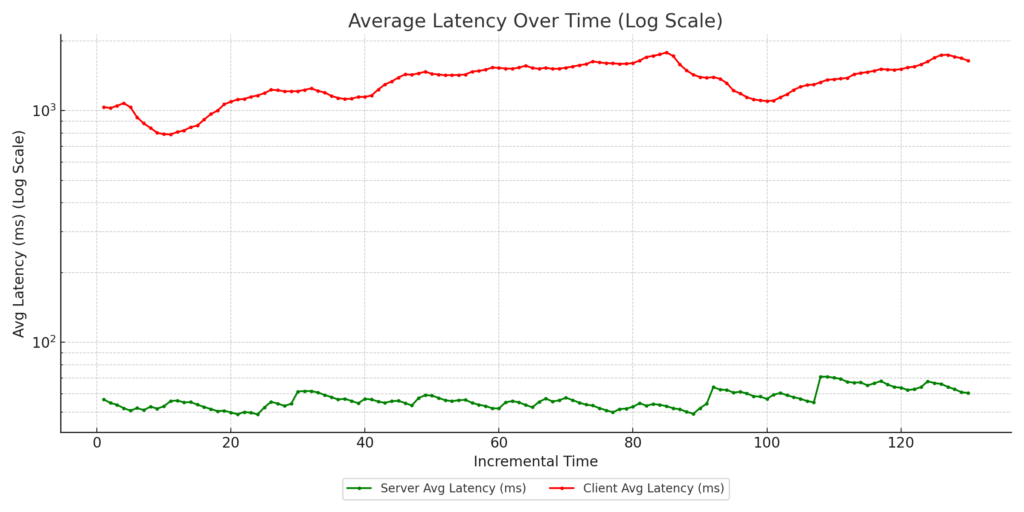
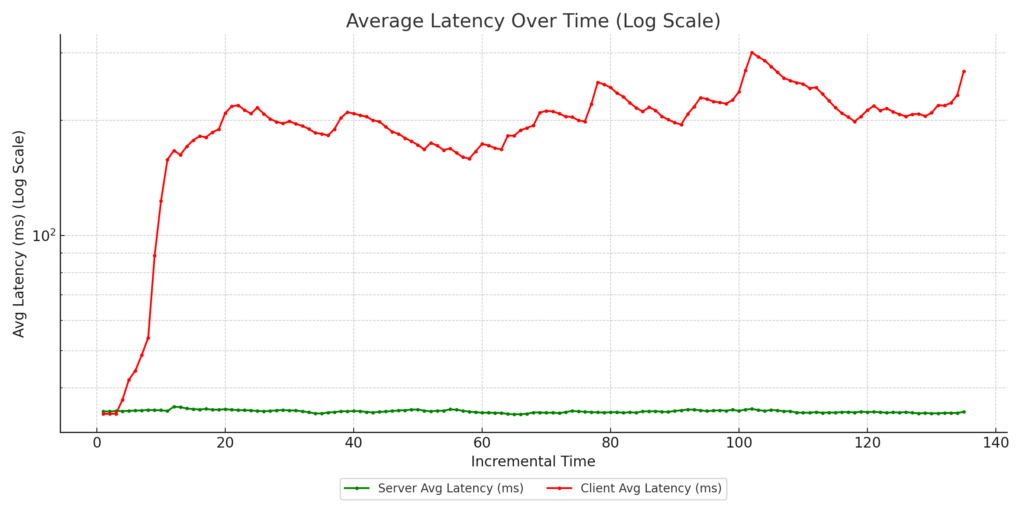
As part of our ongoing research at 802.11 Networks, the team conducted an in-depth traffic shaping and QoS (Quality of Service) test to evaluate how different traffic prioritization strategies perform in real-world conditions. This research aims to help our customers better understand their networks and make educated decisions on configurations that ensure optimal performance.
Test Setup Highlights:
Total Clients: 30
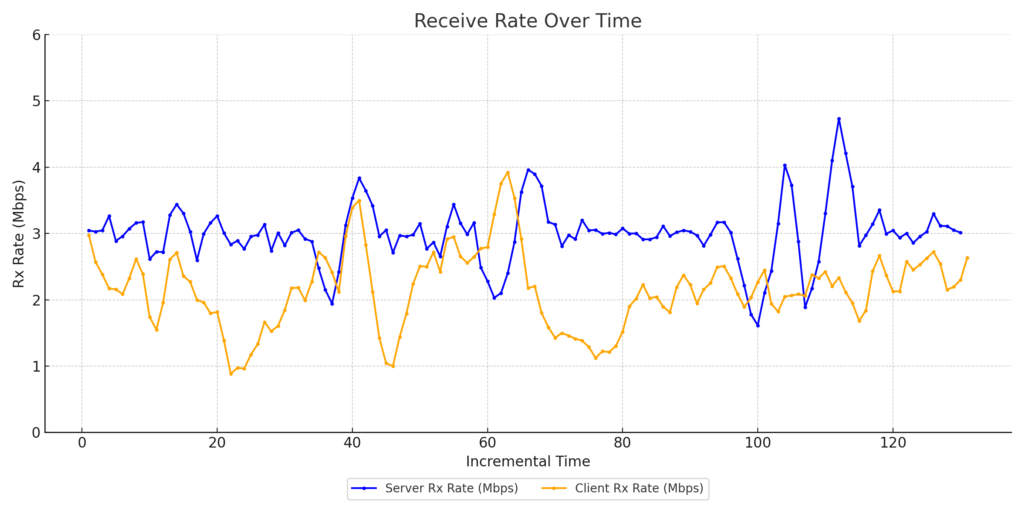
Zoom Clients: 3 (Simulating Zoom calls with 3Mbps uplink and downlink traffic per client)
Streaming Clients: 27 (Simulating video streaming with uplink traffic ranging between 128Kbps–2Mbps and downlink traffic between 1.5Mbps–30Mbps)
Protocol: TCP
Environment: OTA testing inside an RF isolation chamber for accurate and interference-free results
Access Point: CIG WF196, running OpenWiFi v3.2.0
Channel: 48/20MHz
Average RSSI: -60dBm
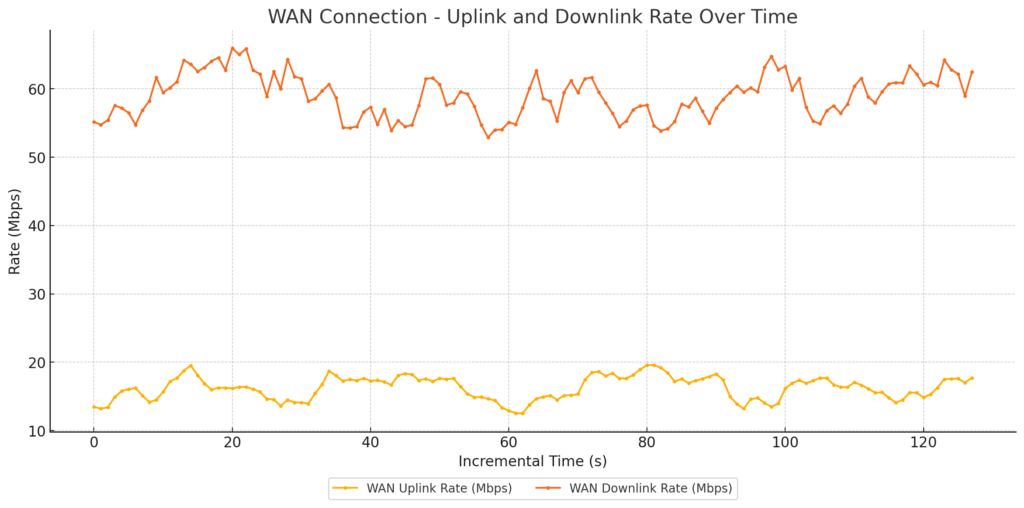
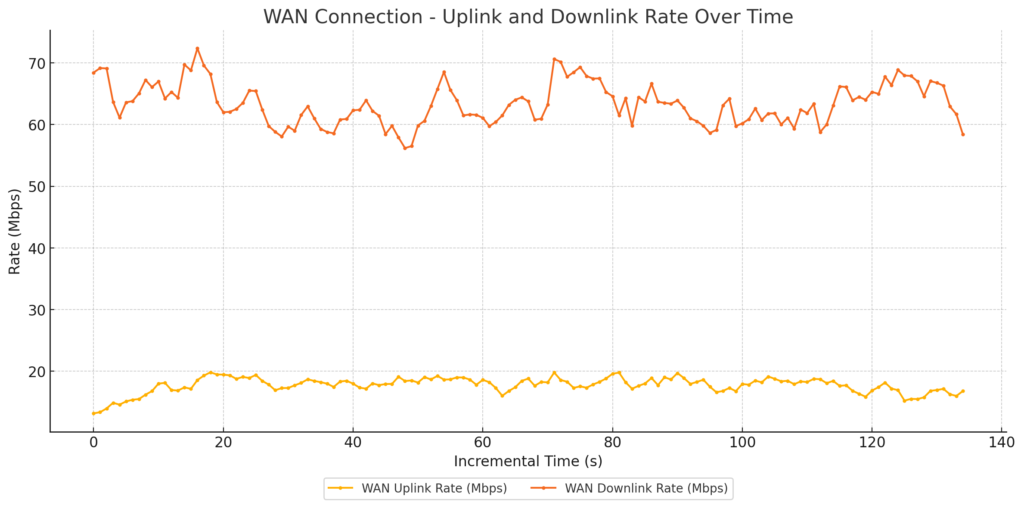
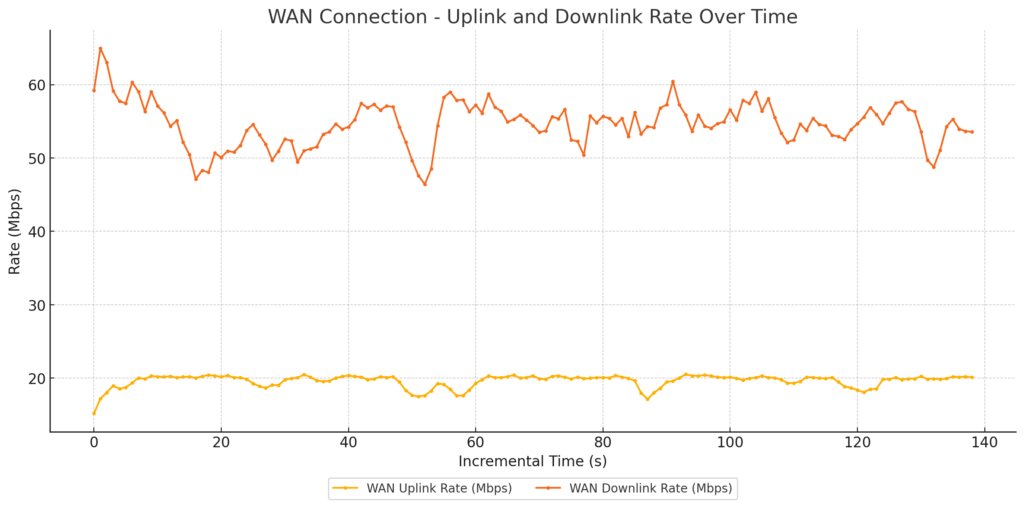
WAN Configuration: Simulated Cable Modem link using Linux TC, with 20Mbps uplink and 1000Mbps downlink to replicate a typical Comcast subscription
AQM:
FQ-CoDel
CAKE
The test environment included a traffic generation server connected to the AP’s WAN link via a Linux box simulating the Cable Modem WAN link. This controlled environment allowed us to precisely measure the effects of various QoS configurations on network performance.
Test Cases Conducted:
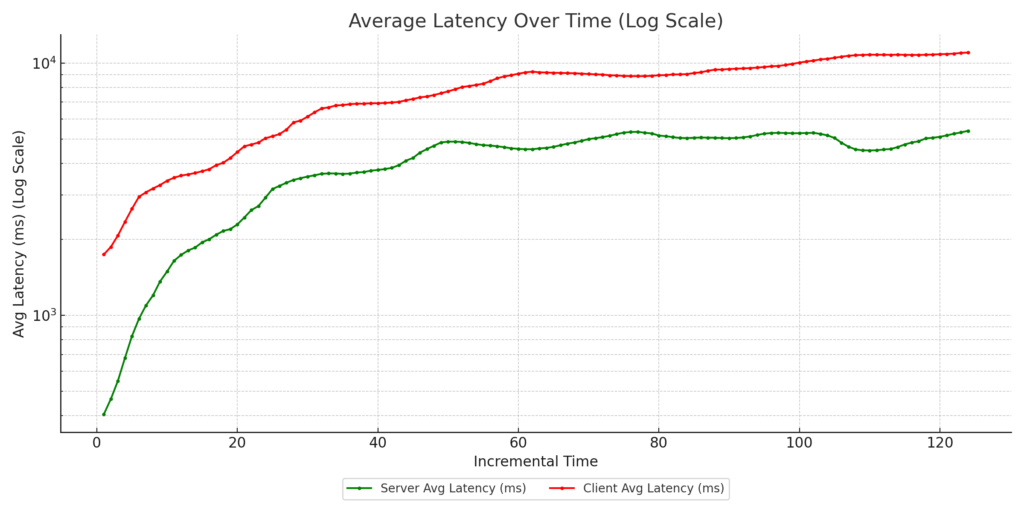
FQ-CoDel with no DSCP marking: Default case with no configurations.
WAN link Traffic
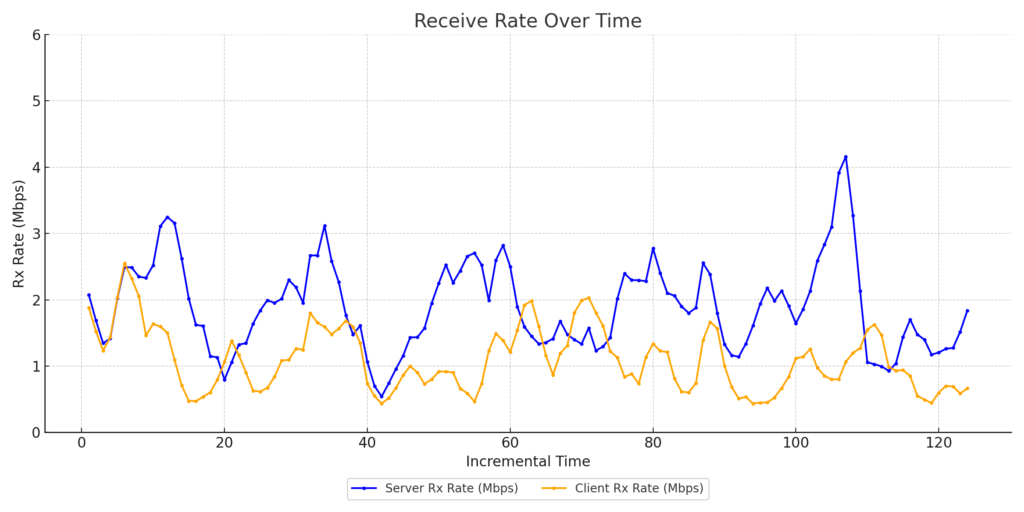
Zoom Client1 Throughput
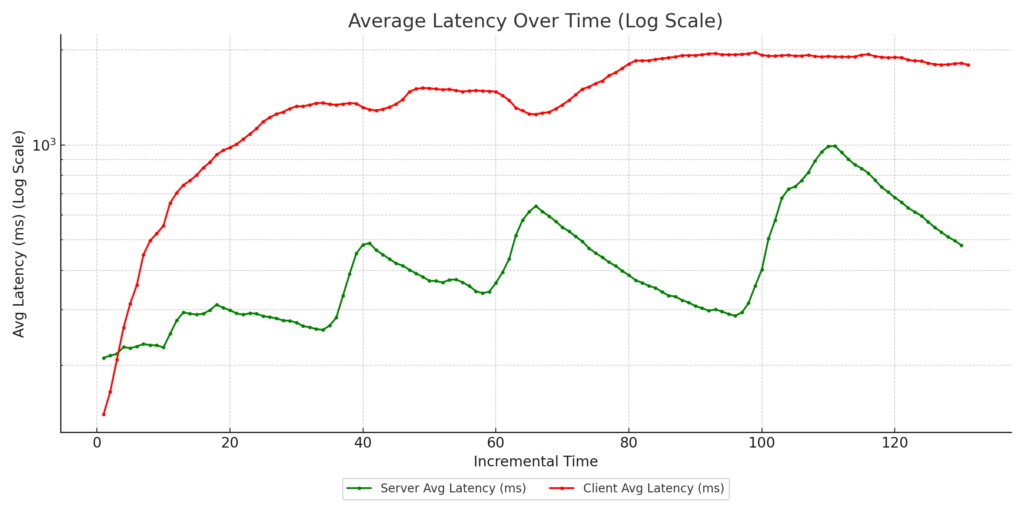
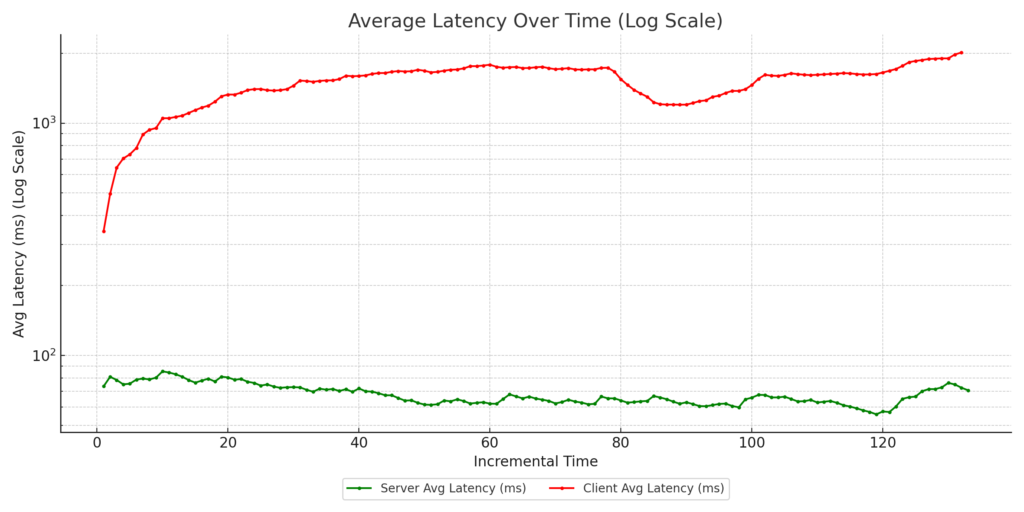
Zoom Client1 Latency
Zoom Client2 Throughput
Zoom Client2 Latency
Zoom Client3 Throughput
Zoom Client3 Latency
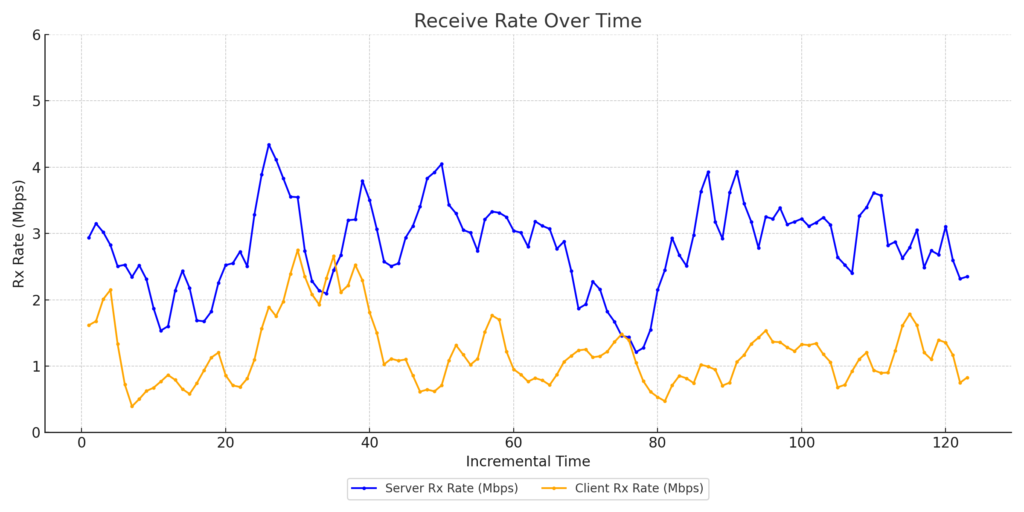
FQ-CoDel with marked uplink: Zoom clients’ uplink traffic marked as video with DSCP CS4.
WAN Link Traffic
Zoom Client1 Throughput
Zoom Client1 Latency
Zoom Client2 Throughput
Zoom Client2 Latency
Zoom Client3 Throughput
Zoom Client3 Latency
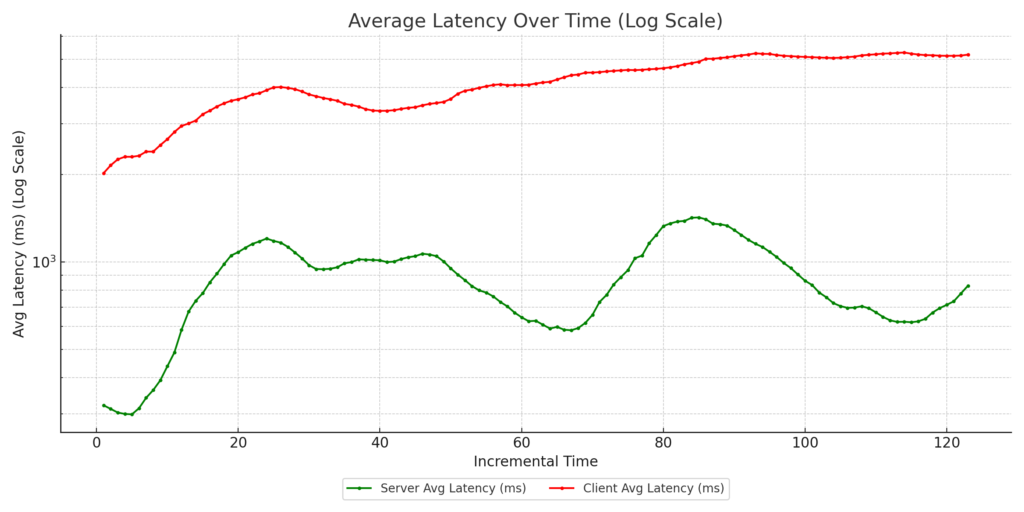
CAKE with eBPF reclassification: No DSCP marking from side clients, but downlink traffic reclassified as CS5 using eBPF programs running in the AP kernel.
WAN Link Traffic
Zoom Client1 Throughput
Zoom Client1 Latency
Zoom Client1 Throughput
Zoom Client2 Latency
Zoom Client3 Throughput
Zoom Client3 Latency
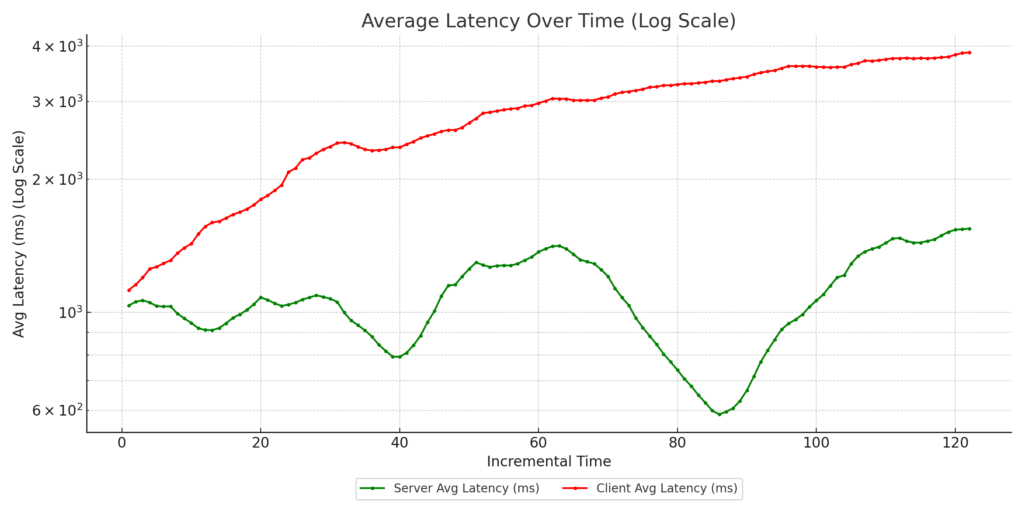
CAKE with eBPF reclassification + marked uplink : Zoom clients’ uplink traffic tagged with DSCP CS4, and downlink traffic reclassified as CS5 using eBPF programs on the AP kernel.
WAN Link Traffic
Zoom Client1 Throughput
Zoom Client1 Latency
Zoom Client2 Throughput
Zoom Client2 Latency
Zoom Client3 Throughput
Zoom Client3 Latency
In all test cases, 802.11e WMM was enabled on the AP to allow for hardware-assisted prioritization of traffic.
Key Takeaways:
Case 4 consistently delivered the best results, with:
Improved guaranteed throughput for the Zoom clients’ vs the streaming clients
Reduced latency for Zoom clients, ensuring call quality
These results highlight the power of combining advanced queuing mechanisms like CAKE with intelligent traffic classification using DSCP and eBPF.
Why This Matters: At 802.11 Networks, we specialize in wireless testing and performance optimization. This research underscores our commitment to helping customers achieve enterprise-grade performance using open-source hardware and intelligent network configurations. By understanding how QoS mechanisms like AQM, DSCP tagging, and WMM affect real-world traffic, network administrators can make informed decisions to enhance user experiences and ensure their networks perform at their peak.
If you’re interested in learning more about these tests or how they can be applied to your network, feel free to reach out or follow for updates.
Want to know which enterprise class Wi-Fi Access Point offers the best value for your enterprise network?
We recently pitted the Ruckus R350 against the Edgecore EAP101 (running OpenWiFi firmware) in a series of rigorous tests. Here’s what we found:
Setup Environment:
The testing was conducted Over-The-Air (OTA) within an RF isolation chamber to ensure minimal interference and consistency. Both the Ruckus R350 and Edgecore EAP101 were tested on channel 112 with a 20MHz bandwidth.
Equipment Used:
LANforge: Used to simulate traffic loads.
RSSI Level: Set at -40 dBm for both APs during the capacity test.
Attenuation Levels: 0-50dB to cover the RSSI dynamic range between -40dBm to -85dBm.
Observations:
Range vs. Rate Test: Both APs performed similarly with the Intel BE200 client across attenuation levels. However, after 20 dB of attenuation, the R350 exhibited a slight dip in throughput performance compared to the EAP101.
Capacity Test: As the number of clients increased, both the EAP101 and R350 maintained a similar performance. However the EAP101 began to show a slight advantage (~7Mbps) once the client count surpassed 40.
Conclusion:
It’s clear that both access points delivered solid results here, however subtle differences emerged as we turned up the heat! The Edgecore EAP101, running the OpenWiFi firmware stack, delivered superior performance when compared to the incumbent Ruckus Unit. The EAP101’s ability to maintain throughput as conditions deteriorated highlights its clear value for organizations looking for a cost-effective solution that still delivers performance on par with the industry’s best!
At 802.11 Networks, we combine deep industry domain knowledge with cutting edge tools to ensure our clients are successful.
If you’re ready to transform your wireless network, reach out and let 802.11 Networks deliver a tailored solution that drives results. Our expertise and advanced tools will help you achieve your goals.